LIMITED TIME: 10% OFF ALL BOOSTERS.Ends Soon!
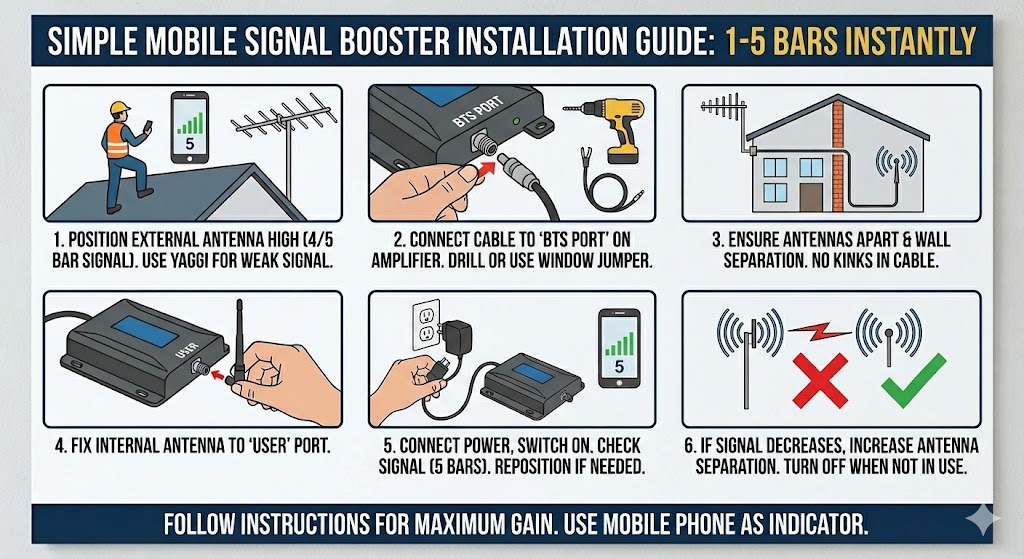 Here is a simple instruction manual for installing a mobile signal booster. The setup is the same for all boosters.
Position the external antenna up high where you have a strong 4 or 5 bar signal (use a mobile phone as the indicator).
If you only have 2 or 3 bars, consider a Yagi antenna to capture weaker signal more effectively for better indoor gain.
Connect the cable from the external antenna to the port labelled BTS on the amplifier.
This may require drilling a 25mm hole. A window jumper can let you route the cable indoors without drilling.
Keep the external and internal antennas as far apart as the cable allows, ideally with a wall separation between them.
Avoid kinks in the cable, as this can cause interference.
Connect the internal cable to the Omni-directional indoor antenna, or attach the whip antenna
to the port labelled USER on the amplifier.
Connect power and switch the booster on. If there is no improvement, re-position the external antenna.
This is usually the most important step for performance.
If your mobile signal drops after switching on, increase the distance between the external and internal antennas.
If you are not using the booster, switch it off.
Install as per the steps above for best results. Trial and error is normal.
Always use your phone as the indicator to find the strongest outdoor signal.
Tip: do a quick walk test around the building to confirm coverage where you need it.

©Copyright 2026 SignalBoosters. All Right Reserved
